Best GoPro for Skiing of 2026
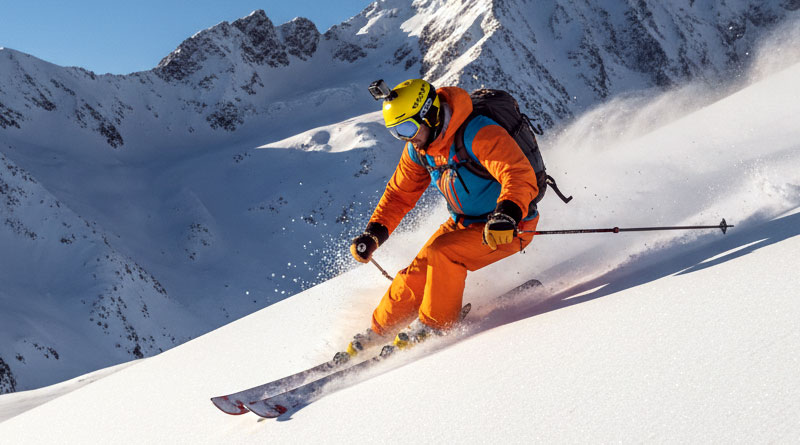
If you love skiing and want to capture every exciting moment on the slopes, a GoPro is the perfect camera for you. These action cameras are built to handle cold, snow, and fast movement, making them ideal for winter sports. Whether you’re recording smooth downhill runs or jumps in the park, the right GoPro can make your videos look stunning. In this guide, we’ll help you find the best GoPro for skiing so you can relive your adventures with clear, high-quality footage.
1. HERO13

- Video Resolution: 5.3K
- Sensor Type: CMOS
- Storage: Micro SD
- Screen Size: 2.27 Inches
The GoPro HERO13 Black raises the bar for action cameras with advanced imaging power and unmatched versatility. It features HB-Series lenses that auto-detect and adjust settings instantly, allowing users to switch seamlessly between shooting modes. The 5.3K video captures breathtaking detail with over 90% more resolution than 4K, while its burst slow-motion mode delivers an incredible 13x slowdown for cinematic results. Whether you’re skiing, biking, or diving, the HERO13 ensures crisp, immersive footage every time.
GoPro’s HyperSmooth 6.0 stabilization keeps your video buttery smooth even in extreme conditions, making gimbals nearly obsolete. It doubles as a high-quality webcam or live-streaming device, providing a perfect tool for vloggers and creators who want professional-grade footage on the go. Fully waterproof and built tough, the HERO13 Black is the ultimate companion for anyone serious about capturing adventure in stunning clarity.
Pros:
- Exceptional 5.3K image clarity
- Outstanding stabilization performance
- Versatile lens and filter auto-detection
- Works as a webcam and live streamer
Cons:
- Premium price tag
- High-resolution recording drains battery faster
2. HERO12

- Video Resolution: 5.3K
- Photo Resolution: 27MP
- Battery: 1720mAh Enduro
- Connectivity: Bluetooth
The GoPro HERO12 Black combines power, endurance, and stunning image quality in one rugged package. It records ultra-sharp 5.3K video and captures 27MP photos with lifelike color and clarity. The Enduro battery delivers up to 70 minutes of continuous recording, even in cold weather. Built to handle tough conditions, the camera is waterproof to 33 feet, making it ideal for outdoor sports and underwater adventures alike.
Its Emmy Award-winning HyperSmooth 6.0 stabilization ensures silky footage, while HDR video and photo modes balance light and shadow perfectly. The HERO12’s 360° Horizon Lock maintains level shots even when the camera spins, and Bluetooth connectivity allows wireless audio from earbuds or mics. With an extra-wide field of view and 8x slo-mo capability, it’s perfect for creators who demand precision and flexibility.
Pros:
- Incredible HDR and 5.3K video quality
- Excellent battery life with Enduro pack
- Advanced stabilization and horizon lock
- Wireless audio connectivity
Cons:
- Can overheat during long 5.3K sessions
- Limited upgrades over HERO11 for casual users
3. HERO11

- Video Resolution: 5.3K
- Photo Resolution: 27MP
- Stabilization: HyperSmooth 5.0
- Connectivity: Wireless
The GoPro HERO11 Black introduces a revolutionary image sensor that delivers the most expansive field of view in the HERO lineup. It captures incredible 5.3K video with fine detail and realistic textures, supported by a water-repelling lens that reduces glare and lens flare. Its 27MP stills and 24.7MP frame grabs let you preserve each moment in vivid clarity, while the 8x slo-mo mode makes even high-speed action cinematic.
With HyperSmooth 5.0 stabilization and 360° Horizon Lock, footage remains level and smooth no matter how intense the action. The new sensor allows creative cropping and flexible aspect ratios, giving content creators plenty of control. Rugged, waterproof, and reliable, the HERO11 Black is ideal for skiers, mountain bikers, and anyone who wants to capture their adventures in stunning high-res detail.
Pros:
- Excellent image stabilization
- High-resolution video and photos
- Flexible editing and cropping options
- Durable, waterproof build
Cons:
- Interface can be complex for beginners
- File sizes are quite large
4. HERO10
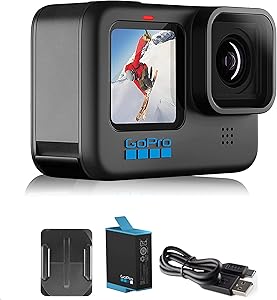
- Processor: GP2 Engine
- Video Resolution: 5.3K60
- Photo Resolution: 23MP
- Connectivity: Wireless
The GoPro HERO10 Black takes performance to the next level with its GP2 processor, offering double the frame rate and faster touch response. It records 5.3K video at 60fps and captures sharp 23MP stills with incredible clarity. The water-shedding hydrophobic lens cover prevents flare and distortion, keeping footage crystal clear even in challenging conditions.
HyperSmooth 4.0 stabilization delivers remarkably steady results, while enhanced horizon leveling ensures perfectly straight footage. The HERO10 also supports ultra-fast transfers and automatic cloud uploads for seamless sharing. Whether shooting fast-paced ski runs or scenic landscapes, this model provides top-tier performance and convenience for enthusiasts and professionals alike.
Pros:
- Ultra-fast GP2 processor
- Super-smooth HyperSmooth 4.0 stabilization
- Exceptional low-light performance
- Quick cloud uploads
Cons:
- Battery drains quickly in 5.3K mode
- Limited improvements over HERO9 in casual use
5. HERO9

- Video Resolution: 5K
- Photo Resolution: 20MP
- Battery: 1720mAh
- Connectivity: Bluetooth
The GoPro HERO9 Black introduced major upgrades that made it a standout among action cameras. With its 5K video capability and 20MP photos, it captures every moment in lifelike clarity. The front display is perfect for vlogging or selfie framing, while the larger rear touch screen offers smooth navigation. Its 1720mAh battery provides 30% more runtime, keeping you shooting longer between charges.
HyperSmooth 3.0 stabilization ensures buttery-smooth footage, even on rugged slopes or rough trails. The HERO9’s powerful new sensor delivers crisp image quality and accurate color, while the waterproof body withstands tough outdoor environments. Whether you’re skiing down a slope or recording underwater, it delivers professional-grade results in a compact, easy-to-use package.
Pros:
- Sharp 5K video and 20MP photos
- Improved battery life
- Front-facing screen for easy framing
- Reliable stabilization
Cons:
- Interface can feel sluggish
- Heavier than earlier models
How to Use a GoPro for Skiing?
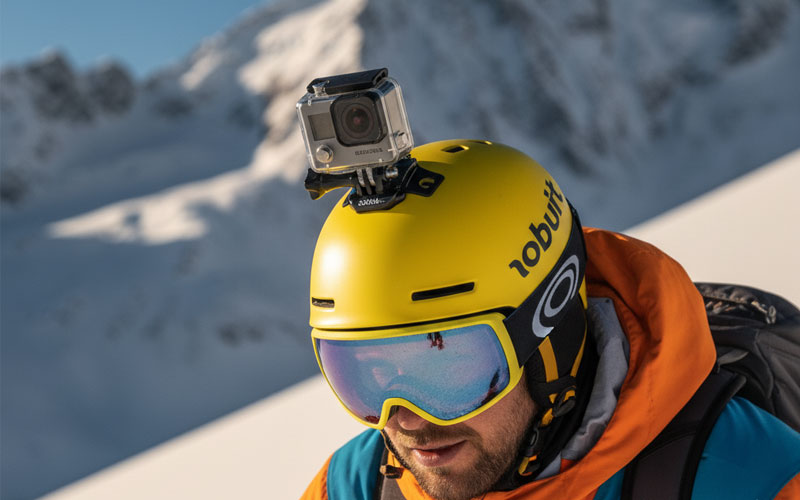
Using a GoPro while skiing is one of the best ways to capture the thrill and beauty of the slopes. With the right setup, you can record stunning high-resolution videos, capture slow-motion turns, and share your skiing adventures with friends or followers. Whether you’re carving through powder, hitting jumps, or simply enjoying a scenic run, a GoPro can make your memories look cinematic. This guide will walk you through everything you need to know—from choosing your GoPro and mounting it correctly to optimizing settings and editing your footage.
Choosing the Right GoPro for Skiing
The latest GoPro models, such as the HERO13, HERO12, and HERO11, are all excellent for skiing. These cameras feature advanced stabilization, high-resolution recording, and weatherproof designs that perform well in cold, snowy conditions. If your main focus is ultra-smooth footage, HyperSmooth stabilization is essential. The HERO13 Black, for example, offers HyperSmooth 6.0, which keeps your video steady even on the bumpiest runs.
Battery life is another key factor to consider. Cold weather can drain batteries quickly, so choosing a model that supports Enduro batteries will help extend recording time. Also, look for cameras with front displays, like the HERO9 and later versions, which are useful for framing shots, especially when using helmet or chest mounts.
Essential Accessories for Skiing
GoPro accessories can make a huge difference in how you capture your skiing footage. Here are a few must-have mounts and accessories for skiers:
Helmet Mount
A helmet mount gives a first-person perspective, making viewers feel like they’re right on the slopes with you. It’s a classic choice for dynamic skiing footage. However, make sure the mount is securely attached, and tilt the camera slightly downward to include more of the slope and your skis in the frame.
Chest Mount
The chest mount provides a lower angle that includes your arms, poles, and skis, creating an immersive, action-packed view. It’s also more stable than a helmet mount and gives a sense of motion without too much shake. This angle is great for technical skiing, as it shows body movement and technique clearly.
Pole or Selfie Mount
A pole mount (or a GoPro-compatible ski pole grip) lets you capture yourself from different angles while skiing. You can film from in front for face shots or behind for follow-cam style footage. Be careful when skiing with a pole mount—keep your grip steady and avoid filming on steep or crowded runs.
Goggle Mount
Attaching your GoPro to the side or top of your goggles offers a similar perspective to the helmet mount but feels lighter and more natural. It’s an excellent choice for short clips or when you want less gear on your helmet.
Recommended GoPro Settings for Skiing
To get the best results on the mountain, you’ll need to adjust your GoPro settings based on the conditions and the type of footage you want to capture. Here are some general tips:
Resolution and Frame Rate
For crisp, detailed video, set your GoPro to record at 4K or 5.3K. If you want slow-motion footage of jumps or turns, use 120fps or 240fps at a lower resolution like 2.7K. The higher frame rates will allow smoother slow-motion playback.
Stabilization and Horizon Lock
Always enable HyperSmooth stabilization for skiing. It will eliminate the majority of shakes and bumps that naturally occur on the slopes. If your GoPro supports Horizon Lock (like on the HERO11 and HERO12), turn it on to keep your footage level even when the camera tilts during turns.
Field of View (FOV)
For skiing, a wide or superview field of view works best. It captures more of your surroundings, including the snow, sky, and trees, giving a sense of speed and immersion. Linear mode is better if you want a more cinematic, distortion-free look.
Exposure and White Balance
Snow can trick your camera’s exposure because it reflects so much light. Set exposure compensation to -0.5 or -1.0 to prevent overexposure. For white balance, leave it on Auto unless you prefer manual control for color correction later in editing.
Tips for Filming on the Slopes
Recording on the mountain requires a bit of preparation and awareness. Here are some practical tips to help you get the most out of your GoPro while skiing:
- Keep your GoPro warm. Store it inside your jacket between runs to prevent battery drain from cold temperatures.
- Use anti-fog inserts in your waterproof housing or protective case to keep your lens clear in humid or snowy conditions.
- Check your angles before starting each run. A few test clips can save you from returning home with footage that’s pointing at the sky or snow.
- Plan your shots. Decide if you want first-person, follow-cam, or scenic clips before you start skiing.
- Keep your lens clean. Snow, ice, and fingerprints can ruin a great shot, so wipe it frequently with a soft cloth.
Creative GoPro Angles for Skiing
Variety makes ski footage more interesting. Mix up your perspectives for a dynamic video that captures both action and atmosphere.
First-Person View
Mounting your GoPro on your helmet or goggles offers a true POV experience, showing exactly what you see as you ski down the slope. It’s great for viewers who want to feel immersed in the ride.
Follow-Cam View
If you’re skiing with friends, have someone follow you with a pole-mounted GoPro. This captures your full body movement and gives a cinematic “chasing” perspective often seen in professional ski edits.
Skis or Boots Angle
Attaching your GoPro to your skis or boots gives a unique, ground-level view of carving turns and snow spray. This shot adds variety and shows the physical motion of skiing up close.
Static or Tripod Shots
Set your GoPro on a tripod or rock near the run to film yourself skiing past the camera. These shots are perfect for scenic locations or slow-motion passes.
Editing and Sharing Your Ski Footage
After a day on the slopes, it’s time to bring your clips together. GoPro’s Quik app or desktop software makes editing easy. You can trim, stabilize, and color-correct your footage, or add music and transitions for a professional touch. Slow-motion segments are especially effective for jumps and powder turns, while time-lapse shots can capture the changing light or lift rides.
Don’t forget to include a mix of wide scenic shots, close-ups, and action clips to keep your final edit engaging. Once you’re done, share your video on social media platforms or upload it to your cloud storage for easy access. Many GoPro models automatically back up footage when connected to Wi-Fi, making the process even simpler.
Safety Tips When Using GoPro on the Slopes
While filming, it’s important not to compromise safety—both yours and others’. Always be aware of your surroundings and avoid filming in crowded areas. Never adjust your camera or change mounts while skiing downhill. Pull over to the side of the run before doing so. Make sure your mounts are securely fastened to prevent the camera from detaching during a fall or impact.
Also, consider the weight and position of your camera. A poorly balanced mount can affect your helmet comfort or your skiing posture. Practice skiing with your GoPro setup before recording serious runs to ensure it doesn’t interfere with your movement.
Conclusion
Using a GoPro for skiing opens up endless possibilities to capture breathtaking footage and unforgettable memories. With the right camera, settings, and mounts, you can film smooth, high-quality videos that showcase your skill and the beauty of the mountain. Experiment with different perspectives, plan your shots, and take advantage of GoPro’s advanced stabilization and image quality. Whether you’re a beginner or a seasoned skier, mastering your GoPro setup will help you relive every exhilarating descent in vivid detail.